Remote Shutter: camera connect13.1.3
Publisher Description


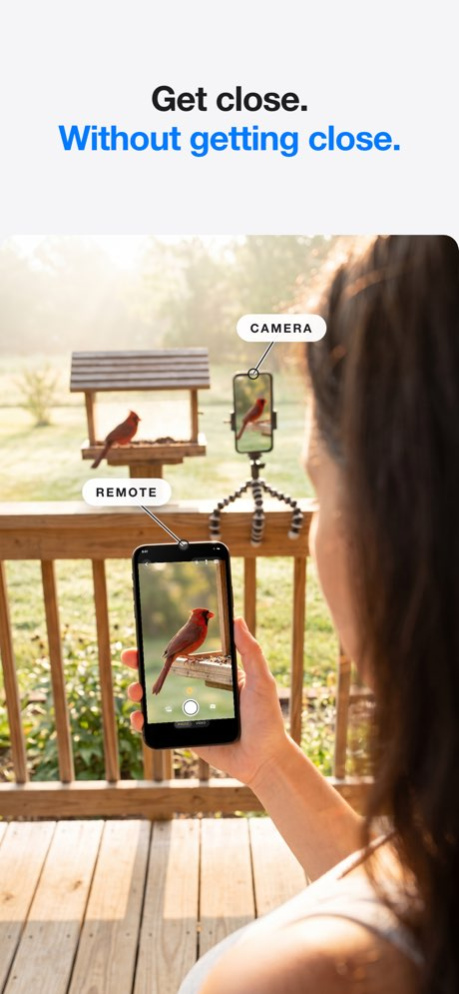
Turn any two devices into a wireless remote camera system - no internet, no router, no account needed. Just connect and shoot.
Remote Shutter uses peer-to-peer technology to link two devices directly. One becomes the camera, the other becomes your remote control with a live monitor. Perfect for group photos, selfies, tripod shots, creative angles, and hands-free photography.
NEW - MULTICAM: UP TO FOUR CAMERAS, ONE DIRECTOR
- Connect up to four iPhones as cameras and see every angle live in a grid
- One synced shutter fires photos or video on every camera at the same instant
- Footage collects automatically to the director, time-aligned for editing
- Set frame rate, resolution, aspect ratio, HDR and focus for every camera from the director
- Interviews, music, sports, dance, unboxings - shoot every angle at once
FULL MAC SUPPORT
- Use your Mac as the camera: built-in, USB and pro webcams, even your iPhone via Continuity Camera
- Switch between every camera connected to your Mac, live from your iPhone
- Or flip it: use your Mac's big screen as a director's monitor for your iPhone camera
FEATURES
- Control your camera from your Apple Watch - trigger the shutter from your wrist
- Selfies and group shots on the sharp rear camera - frame yourself from the remote's live preview
- Wireless remote shutter from up to 50 feet away
- Live camera preview on your remote device
- Switch cameras remotely - front/back on iPhone, any connected camera on Mac
- Camera flash control
- Adjustable photo timer
- Record video remotely - choose 24/30/60 fps, 1080p or 4K, aspect ratio and HDR from the remote
- Tap to focus on the remote's live preview (Pro)
- Works with iPhone, iPad, and Mac
- No internet or Wi-Fi network required - direct device-to-device connection (just keep Wi-Fi and Bluetooth turned on)
HOW TO USE
1. Open Remote Shutter on two devices
2. Devices connect automatically via peer-to-peer
3. Choose which device is the camera and which is the remote
4. Start shooting from anywhere in the room!
Whether you're directing four iPhones on a music video, shooting products with a pro camera on your Mac, directing from the big screen, or setting up a family photo, Remote Shutter gives you full wireless control of your camera from another device.
Version History Manual exposure: set shutter speed, ISO and exposure compensation from the remote.
Multicam: connect up to four cameras and fire them all with one synced shutter. 13.1.3 Sep 27 FIXED — "Send Media to Remote" works again
- With the setting off on the remote, photos and videos stay on the camera only. The remote no longer keeps a duplicate copy
- With it on, everything still arrives on the remote as before
NEW — Multicam: up to four cameras, one director
- Connect up to four iPhones as cameras and see every angle live in a grid
- One synced shutter fires photos or video on every camera at the same instant
- Footage collects automatically to the director, time-aligned for editing
The remote is redesigned around the viewfinder: the picture first, the controls out of its way.
- Full-screen live preview: the shot now fills the display with the controls floating over it, instead of a small picture squeezed above a panel of buttons
- Landscape support: turn the remote sideways and the image takes over almost the entire screen
- A tidier layout: self-timer, aspect ratio and quality moved into a panel one tap away, each showing its current setting at a glance
- Clear connection status: a quiet indicator confirms the picture is live, and says so the moment the feed stalls
- Nothing covers your shot: capture progress now appears on the shutter button instead of a pop-up over the frame you are composing
- Camera standby: the device acting as the camera can rest its own screen during long shoots while it keeps streaming and shooting
Recently added:
- Stormo QUIC P2P engine: the device-to-device link rebuilt on QUIC, the transport behind HTTP/3, encrypted with TLS 1.3 and still direct device to device, with no router or network needed
- Please update Remote Shutter on both devices. Older versions can't pair with this one
- Tap to Focus: tap the live preview to set focus and exposure exactly where you want it, included with Pro
- Real-time video: a smooth live feed replaces still snapshots, so framing every shot is effortless
- Gear Store: browse tripods, mounts, and accessories picked for your camera setup
- Reliability and performance improvements throughout 11.0.0 Sep 18 NEW — Multicam: up to four cameras, one director
- Connect up to four iPhones as cameras and see every angle live in a grid
- One synced shutter fires photos or video on every camera at the same instant
- Footage collects automatically to the director, time-aligned for editing
The remote is redesigned around the viewfinder: the picture first, the controls out of its way.
- Full-screen live preview: the shot now fills the display with the controls floating over it, instead of a small picture squeezed above a panel of buttons
- Landscape support: turn the remote sideways and the image takes over almost the entire screen
- A tidier layout: self-timer, aspect ratio and quality moved into a panel one tap away, each showing its current setting at a glance
- Clear connection status: a quiet indicator confirms the picture is live, and says so the moment the feed stalls
- Nothing covers your shot: capture progress now appears on the shutter button instead of a pop-up over the frame you are composing
- Camera standby: the device acting as the camera can rest its own screen during long shoots while it keeps streaming and shooting
Recently added:
- Stormo QUIC P2P engine: the device-to-device link rebuilt on QUIC, the transport behind HTTP/3, encrypted with TLS 1.3 and still direct device to device, with no router or network needed
- Please update Remote Shutter on both devices. Older versions can't pair with this one
- Tap to Focus: tap the live preview to set focus and exposure exactly where you want it, included with Pro
- Real-time video: a smooth live feed replaces still snapshots, so framing every shot is effortless
- Gear Store: browse tripods, mounts, and accessories picked for your camera setup
- Reliability and performance improvements throughout 10.0.3 Aug 21 The remote is redesigned around the viewfinder: the picture first, the controls out of its way.
- Full-screen live preview: the shot now fills the display with the controls floating over it, instead of a small picture squeezed above a panel of buttons
- Landscape support: turn the remote sideways and the image takes over almost the entire screen
- A tidier layout: self-timer, aspect ratio and quality moved into a panel one tap away, each showing its current setting at a glance
- Clear connection status: a quiet indicator confirms the picture is live, and says so the moment the feed stalls
- Nothing covers your shot: capture progress now appears on the shutter button instead of a pop-up over the frame you are composing
- Camera standby: the device acting as the camera can rest its own screen during long shoots while it keeps streaming and shooting
Recently added:
- Stormo QUIC P2P engine: the device-to-device link rebuilt on QUIC, the transport behind HTTP/3, encrypted with TLS 1.3 and still direct device to device, with no router or network needed
- Please update Remote Shutter on both devices. Older versions can't pair with this one
- Tap to Focus: tap the live preview to set focus and exposure exactly where you want it, included with Pro
- Real-time video: a smooth live feed replaces still snapshots, so framing every shot is effortless
- Gear Store: browse tripods, mounts, and accessories picked for your camera setup
- Reliability and performance improvements throughout 9.0.6 Aug 3 A major upgrade to the connection itself: the new Stormo engine.
- Stormo QUIC P2P engine: the device-to-device link is rebuilt on QUIC, the transport behind HTTP/3
- Self-healing connection: pairing lands quicker, live preview holds steady, and dropouts heal themselves
- Encrypted with TLS 1.3 and still direct device to device, with no router or network needed
- Please update Remote Shutter on both devices. Older versions can't pair with this one
Recently added:
- Tap to Focus: tap the live preview to set focus and exposure exactly where you want it, included with Pro
- Real-time video: a smooth live feed replaces still snapshots, so framing every shot is effortless
- Redesigned zoom slider: finer, smoother control from across the room
- Gear Store: browse tripods, mounts, and accessories picked for your camera setup
- Reliability and performance improvements throughout 9.0.5 Jul 30 A sharper, smoother remote camera.
- Tap to Focus: tap the live preview to set focus and exposure exactly where you want it — included with Pro
- Real-time video: a smooth live feed replaces still snapshots, so framing every shot is effortless
- Redesigned zoom slider: finer, smoother control from across the room
- Gear Store: browse tripods, mounts, and accessories picked for your camera setup
- Reliability and performance improvements throughout 8.0.5 Jul 25 A sharper, smoother remote camera.
- Tap to Focus: tap the live preview to set focus and exposure exactly where you want it — included with Pro
- Real-time video: a smooth live feed replaces still snapshots, so framing every shot is effortless
- Redesigned zoom slider: finer, smoother control from across the room
- Gear Store: browse tripods, mounts, and accessories picked for your camera setup
- Reliability and performance improvements throughout 8.0.4 Jul 17 Apple Watch support is here!
- NEW: Control your camera straight from your Apple Watch — trigger the shutter right from your wrist
- Perfect for tripods, telescopes, and long-range camera rigs where you can't reach your phone
- Live connection status on your Watch so you always know you're linked
- Improved connection reliability between Watch, iPhone, and iPad
- Bug fixes and performance improvements 7.0.2 Jul 12 Apple Watch support is here!
- NEW: Control your camera straight from your Apple Watch — trigger the shutter right from your wrist
- Perfect for tripods, telescopes, and long-range camera rigs where you can't reach your phone
- Live connection status on your Watch so you always know you're linked
- Improved connection reliability between Watch, iPhone, and iPad
- Bug fixes and performance improvements 6.0.11 Jul 7 Apple Watch support is here!
- NEW: Control your camera straight from your Apple Watch — trigger the shutter right from your wrist
- Perfect for tripods, telescopes, and long-range camera rigs where you can't reach your phone
- Live connection status on your Watch so you always know you're linked
- Improved connection reliability between Watch, iPhone, and iPad
- Bug fixes and performance improvements 6.0.8 Jul 2 - New: Choose your role (Camera or Remote) before scanning
- Camera mode: Go online and wait for a Remote to connect
- Remote mode: Scan for nearby cameras and connect
- Improved help tutorial with updated step-by-step guide
- Full localization: now available in 10 languages
- Fixed disconnect error showing after successful photo sessions
- UI improvements for camera and remote scanner screens 5.5.1 Mar 22 - Fixed lens selection: 2X now correctly uses the 2X lens, not 5X
- Zoom works across all lenses (0.5x ultra-wide to 5x telephoto)
- New aspect ratio controls: shoot in 4:3, 16:9, or 1:1 (photo and video)
- Smoother pinch-to-zoom with logarithmic sensitivity
- Zoom and lens switching now work during video recording 5.4.2 Mar 20 - Camera now shows current mode and quality settings (Photo/Video, resolution, fps)
- Timer countdown displayed on camera with big numbers, chimes, and torch blink
- Photo and video quality controls on the remote (resolution, fps, format, HDR)
- Settings sync between remote and camera after toggling cameras
- Controls collapse state now persists across sessions 5.3.0 Mar 16 - Fixed connectivity bugs
- Reduced number of steps to connect devices 5.2.3 Mar 9 - Fixed connectivity bugs
- Reduced number of steps to connect devices 5.0.4 Mar 4 compiled with the latest greatest iOS
Addressed stability issues 4.14 Mar 1 changed max timer duration from 10 to 20 seconds 4.13 10/28/2025 new icon 4.12 08/04/2025 We redesigned the remote!!! made it faster and more reliable!! (all rewritten in SwiftUI) 4.11 07/30/2025 better explanation for Local Network permission
better permission request logic 4.6 07/23/2025 Added Torch mode
Add zoom during video recording 4.4 07/15/2025 1. Pinch to zoom
2. switch lenses 4.2 07/10/2025 Added switch in settings screen to disable sending video/pictures to the remote. 3.5 07/19/2022 Fixed restore button 3.4 07/09/2022 fixed the restore purchases button 3.3 06/11/2021
About Remote Shutter: camera connect
The company that develops Remote Shutter: camera connect is Security Union LLC. The latest version released by its developer is 13.1.3.
To install Remote Shutter: camera connect on your iOS device, just click the green Continue To App button above to start the installation process. The app is listed on our website since 2026-10-13 and was downloaded 5 times. We have already checked if the download link is safe, however for your own protection we recommend that you scan the downloaded app with your antivirus. Your antivirus may detect the Remote Shutter: camera connect as malware if the download link is broken.
How to install Remote Shutter: camera connect on your iOS device:
- Click on the Continue To App button on our website. This will redirect you to the App Store.
- Once the Remote Shutter: camera connect is shown in the iTunes listing of your iOS device, you can start its download and installation. Tap on the GET button to the right of the app to start downloading it.
- If you are not logged-in the iOS appstore app, you'll be prompted for your your Apple ID and/or password.
- After Remote Shutter: camera connect is downloaded, you'll see an INSTALL button to the right. Tap on it to start the actual installation of the iOS app.
- Once installation is finished you can tap on the OPEN button to start it. Its icon will also be added to your device home screen.
Program Details
System requirements
Download information
Pricing
Version History
version 13.1.3
posted on 2026-10-13
Version History Manual exposure: set shutter speed, ISO and exposure compensation from the remote.
Multicam: connect up to four cameras and fire them all with one synced shutter. 13.1.3 Sep 27 FIXED — "Send Media to Remote" works again
- With the setting off on the remote, photos and videos stay on the camera only. The remote no longer keeps a duplicate copy
- With it on, everything still arrives on the remote as before
NEW — Multicam: up to four cameras, one director
- Connect up to four iPhones as cameras and see every angle live in a grid
- One synced shutter fires photos or video on every camera at the same instant
- Footage collects automatically to the director, time-aligned for editing
The remote is redesigned around the viewfinder: the picture first, the controls out of its way.
- Full-screen live preview: the shot now fills the display with the controls floating over it, instead of a small picture squeezed above a panel of buttons
- Landscape support: turn the remote sideways and the image takes over almost the entire screen
- A tidier layout: self-timer, aspect ratio and quality moved into a panel one tap away, each showing its current setting at a glance
- Clear connection status: a quiet indicator confirms the picture is live, and says so the moment the feed stalls
- Nothing covers your shot: capture progress now appears on the shutter button instead of a pop-up over the frame you are composing
- Camera standby: the device acting as the camera can rest its own screen during long shoots while it keeps streaming and shooting
Recently added:
- Stormo QUIC P2P engine: the device-to-device link rebuilt on QUIC, the transport behind HTTP/3, encrypted with TLS 1.3 and still direct device to device, with no router or network needed
- Please update Remote Shutter on both devices. Older versions can't pair with this one
- Tap to Focus: tap the live preview to set focus and exposure exactly where you want it, included with Pro
- Real-time video: a smooth live feed replaces still snapshots, so framing every shot is effortless
- Gear Store: browse tripods, mounts, and accessories picked for your camera setup
- Reliability and performance improvements throughout 11.0.0 Sep 18 NEW — Multicam: up to four cameras, one director
- Connect up to four iPhones as cameras and see every angle live in a grid
- One synced shutter fires photos or video on every camera at the same instant
- Footage collects automatically to the director, time-aligned for editing
The remote is redesigned around the viewfinder: the picture first, the controls out of its way.
- Full-screen live preview: the shot now fills the display with the controls floating over it, instead of a small picture squeezed above a panel of buttons
- Landscape support: turn the remote sideways and the image takes over almost the entire screen
- A tidier layout: self-timer, aspect ratio and quality moved into a panel one tap away, each showing its current setting at a glance
- Clear connection status: a quiet indicator confirms the picture is live, and says so the moment the feed stalls
- Nothing covers your shot: capture progress now appears on the shutter button instead of a pop-up over the frame you are composing
- Camera standby: the device acting as the camera can rest its own screen during long shoots while it keeps streaming and shooting
Recently added:
- Stormo QUIC P2P engine: the device-to-device link rebuilt on QUIC, the transport behind HTTP/3, encrypted with TLS 1.3 and still direct device to device, with no router or network needed
- Please update Remote Shutter on both devices. Older versions can't pair with this one
- Tap to Focus: tap the live preview to set focus and exposure exactly where you want it, included with Pro
- Real-time video: a smooth live feed replaces still snapshots, so framing every shot is effortless
- Gear Store: browse tripods, mounts, and accessories picked for your camera setup
- Reliability and performance improvements throughout 10.0.3 Aug 21 The remote is redesigned around the viewfinder: the picture first, the controls out of its way.
- Full-screen live preview: the shot now fills the display with the controls floating over it, instead of a small picture squeezed above a panel of buttons
- Landscape support: turn the remote sideways and the image takes over almost the entire screen
- A tidier layout: self-timer, aspect ratio and quality moved into a panel one tap away, each showing its current setting at a glance
- Clear connection status: a quiet indicator confirms the picture is live, and says so the moment the feed stalls
- Nothing covers your shot: capture progress now appears on the shutter button instead of a pop-up over the frame you are composing
- Camera standby: the device acting as the camera can rest its own screen during long shoots while it keeps streaming and shooting
Recently added:
- Stormo QUIC P2P engine: the device-to-device link rebuilt on QUIC, the transport behind HTTP/3, encrypted with TLS 1.3 and still direct device to device, with no router or network needed
- Please update Remote Shutter on both devices. Older versions can't pair with this one
- Tap to Focus: tap the live preview to set focus and exposure exactly where you want it, included with Pro
- Real-time video: a smooth live feed replaces still snapshots, so framing every shot is effortless
- Gear Store: browse tripods, mounts, and accessories picked for your camera setup
- Reliability and performance improvements throughout 9.0.6 Aug 3 A major upgrade to the connection itself: the new Stormo engine.
- Stormo QUIC P2P engine: the device-to-device link is rebuilt on QUIC, the transport behind HTTP/3
- Self-healing connection: pairing lands quicker, live preview holds steady, and dropouts heal themselves
- Encrypted with TLS 1.3 and still direct device to device, with no router or network needed
- Please update Remote Shutter on both devices. Older versions can't pair with this one
Recently added:
- Tap to Focus: tap the live preview to set focus and exposure exactly where you want it, included with Pro
- Real-time video: a smooth live feed replaces still snapshots, so framing every shot is effortless
- Redesigned zoom slider: finer, smoother control from across the room
- Gear Store: browse tripods, mounts, and accessories picked for your camera setup
- Reliability and performance improvements throughout 9.0.5 Jul 30 A sharper, smoother remote camera.
- Tap to Focus: tap the live preview to set focus and exposure exactly where you want it — included with Pro
- Real-time video: a smooth live feed replaces still snapshots, so framing every shot is effortless
- Redesigned zoom slider: finer, smoother control from across the room
- Gear Store: browse tripods, mounts, and accessories picked for your camera setup
- Reliability and performance improvements throughout 8.0.5 Jul 25 A sharper, smoother remote camera.
- Tap to Focus: tap the live preview to set focus and exposure exactly where you want it — included with Pro
- Real-time video: a smooth live feed replaces still snapshots, so framing every shot is effortless
- Redesigned zoom slider: finer, smoother control from across the room
- Gear Store: browse tripods, mounts, and accessories picked for your camera setup
- Reliability and performance improvements throughout 8.0.4 Jul 17 Apple Watch support is here!
- NEW: Control your camera straight from your Apple Watch — trigger the shutter right from your wrist
- Perfect for tripods, telescopes, and long-range camera rigs where you can't reach your phone
- Live connection status on your Watch so you always know you're linked
- Improved connection reliability between Watch, iPhone, and iPad
- Bug fixes and performance improvements 7.0.2 Jul 12 Apple Watch support is here!
- NEW: Control your camera straight from your Apple Watch — trigger the shutter right from your wrist
- Perfect for tripods, telescopes, and long-range camera rigs where you can't reach your phone
- Live connection status on your Watch so you always know you're linked
- Improved connection reliability between Watch, iPhone, and iPad
- Bug fixes and performance improvements 6.0.11 Jul 7 Apple Watch support is here!
- NEW: Control your camera straight from your Apple Watch — trigger the shutter right from your wrist
- Perfect for tripods, telescopes, and long-range camera rigs where you can't reach your phone
- Live connection status on your Watch so you always know you're linked
- Improved connection reliability between Watch, iPhone, and iPad
- Bug fixes and performance improvements 6.0.8 Jul 2 - New: Choose your role (Camera or Remote) before scanning
- Camera mode: Go online and wait for a Remote to connect
- Remote mode: Scan for nearby cameras and connect
- Improved help tutorial with updated step-by-step guide
- Full localization: now available in 10 languages
- Fixed disconnect error showing after successful photo sessions
- UI improvements for camera and remote scanner screens 5.5.1 Mar 22 - Fixed lens selection: 2X now correctly uses the 2X lens, not 5X
- Zoom works across all lenses (0.5x ultra-wide to 5x telephoto)
- New aspect ratio controls: shoot in 4:3, 16:9, or 1:1 (photo and video)
- Smoother pinch-to-zoom with logarithmic sensitivity
- Zoom and lens switching now work during video recording 5.4.2 Mar 20 - Camera now shows current mode and quality settings (Photo/Video, resolution, fps)
- Timer countdown displayed on camera with big numbers, chimes, and torch blink
- Photo and video quality controls on the remote (resolution, fps, format, HDR)
- Settings sync between remote and camera after toggling cameras
- Controls collapse state now persists across sessions 5.3.0 Mar 16 - Fixed connectivity bugs
- Reduced number of steps to connect devices 5.2.3 Mar 9 - Fixed connectivity bugs
- Reduced number of steps to connect devices 5.0.4 Mar 4 compiled with the latest greatest iOS
Addressed stability issues 4.14 Mar 1 changed max timer duration from 10 to 20 seconds 4.13 10/28/2025 new icon 4.12 08/04/2025 We redesigned the remote!!! made it faster and more reliable!! (all rewritten in SwiftUI) 4.11 07/30/2025 better explanation for Local Network permission
better permission request logic 4.6 07/23/2025 Added Torch mode
Add zoom during video recording 4.4 07/15/2025 1. Pinch to zoom
2. switch lenses 4.2 07/10/2025 Added switch in settings screen to disable sending video/pictures to the remote. 3.5 07/19/2022 Fixed restore button 3.4 07/09/2022 fixed the restore purchases button 3.3 06/11/2021
version 13.1.3
posted on 2026-10-02
Version History Manual exposure: set shutter speed, ISO and exposure compensation from the remote.
Multicam: connect up to four cameras and fire them all with one synced shutter. 13.1.3 4d ago FIXED — "Send Media to Remote" works again
- With the setting off on the remote, photos and videos stay on the camera only. The remote no longer keeps a duplicate copy
- With it on, everything still arrives on the remote as before
NEW — Multicam: up to four cameras, one director
- Connect up to four iPhones as cameras and see every angle live in a grid
- One synced shutter fires photos or video on every camera at the same instant
- Footage collects automatically to the director, time-aligned for editing
The remote is redesigned around the viewfinder: the picture first, the controls out of its way.
- Full-screen live preview: the shot now fills the display with the controls floating over it, instead of a small picture squeezed above a panel of buttons
- Landscape support: turn the remote sideways and the image takes over almost the entire screen
- A tidier layout: self-timer, aspect ratio and quality moved into a panel one tap away, each showing its current setting at a glance
- Clear connection status: a quiet indicator confirms the picture is live, and says so the moment the feed stalls
- Nothing covers your shot: capture progress now appears on the shutter button instead of a pop-up over the frame you are composing
- Camera standby: the device acting as the camera can rest its own screen during long shoots while it keeps streaming and shooting
Recently added:
- Stormo QUIC P2P engine: the device-to-device link rebuilt on QUIC, the transport behind HTTP/3, encrypted with TLS 1.3 and still direct device to device, with no router or network needed
- Please update Remote Shutter on both devices. Older versions can't pair with this one
- Tap to Focus: tap the live preview to set focus and exposure exactly where you want it, included with Pro
- Real-time video: a smooth live feed replaces still snapshots, so framing every shot is effortless
- Gear Store: browse tripods, mounts, and accessories picked for your camera setup
- Reliability and performance improvements throughout 11.0.0 Sep 18 NEW — Multicam: up to four cameras, one director
- Connect up to four iPhones as cameras and see every angle live in a grid
- One synced shutter fires photos or video on every camera at the same instant
- Footage collects automatically to the director, time-aligned for editing
The remote is redesigned around the viewfinder: the picture first, the controls out of its way.
- Full-screen live preview: the shot now fills the display with the controls floating over it, instead of a small picture squeezed above a panel of buttons
- Landscape support: turn the remote sideways and the image takes over almost the entire screen
- A tidier layout: self-timer, aspect ratio and quality moved into a panel one tap away, each showing its current setting at a glance
- Clear connection status: a quiet indicator confirms the picture is live, and says so the moment the feed stalls
- Nothing covers your shot: capture progress now appears on the shutter button instead of a pop-up over the frame you are composing
- Camera standby: the device acting as the camera can rest its own screen during long shoots while it keeps streaming and shooting
Recently added:
- Stormo QUIC P2P engine: the device-to-device link rebuilt on QUIC, the transport behind HTTP/3, encrypted with TLS 1.3 and still direct device to device, with no router or network needed
- Please update Remote Shutter on both devices. Older versions can't pair with this one
- Tap to Focus: tap the live preview to set focus and exposure exactly where you want it, included with Pro
- Real-time video: a smooth live feed replaces still snapshots, so framing every shot is effortless
- Gear Store: browse tripods, mounts, and accessories picked for your camera setup
- Reliability and performance improvements throughout 10.0.3 Aug 21 The remote is redesigned around the viewfinder: the picture first, the controls out of its way.
- Full-screen live preview: the shot now fills the display with the controls floating over it, instead of a small picture squeezed above a panel of buttons
- Landscape support: turn the remote sideways and the image takes over almost the entire screen
- A tidier layout: self-timer, aspect ratio and quality moved into a panel one tap away, each showing its current setting at a glance
- Clear connection status: a quiet indicator confirms the picture is live, and says so the moment the feed stalls
- Nothing covers your shot: capture progress now appears on the shutter button instead of a pop-up over the frame you are composing
- Camera standby: the device acting as the camera can rest its own screen during long shoots while it keeps streaming and shooting
Recently added:
- Stormo QUIC P2P engine: the device-to-device link rebuilt on QUIC, the transport behind HTTP/3, encrypted with TLS 1.3 and still direct device to device, with no router or network needed
- Please update Remote Shutter on both devices. Older versions can't pair with this one
- Tap to Focus: tap the live preview to set focus and exposure exactly where you want it, included with Pro
- Real-time video: a smooth live feed replaces still snapshots, so framing every shot is effortless
- Gear Store: browse tripods, mounts, and accessories picked for your camera setup
- Reliability and performance improvements throughout 9.0.6 Aug 3 A major upgrade to the connection itself: the new Stormo engine.
- Stormo QUIC P2P engine: the device-to-device link is rebuilt on QUIC, the transport behind HTTP/3
- Self-healing connection: pairing lands quicker, live preview holds steady, and dropouts heal themselves
- Encrypted with TLS 1.3 and still direct device to device, with no router or network needed
- Please update Remote Shutter on both devices. Older versions can't pair with this one
Recently added:
- Tap to Focus: tap the live preview to set focus and exposure exactly where you want it, included with Pro
- Real-time video: a smooth live feed replaces still snapshots, so framing every shot is effortless
- Redesigned zoom slider: finer, smoother control from across the room
- Gear Store: browse tripods, mounts, and accessories picked for your camera setup
- Reliability and performance improvements throughout 9.0.5 Jul 30 A sharper, smoother remote camera.
- Tap to Focus: tap the live preview to set focus and exposure exactly where you want it — included with Pro
- Real-time video: a smooth live feed replaces still snapshots, so framing every shot is effortless
- Redesigned zoom slider: finer, smoother control from across the room
- Gear Store: browse tripods, mounts, and accessories picked for your camera setup
- Reliability and performance improvements throughout 8.0.5 Jul 25 A sharper, smoother remote camera.
- Tap to Focus: tap the live preview to set focus and exposure exactly where you want it — included with Pro
- Real-time video: a smooth live feed replaces still snapshots, so framing every shot is effortless
- Redesigned zoom slider: finer, smoother control from across the room
- Gear Store: browse tripods, mounts, and accessories picked for your camera setup
- Reliability and performance improvements throughout 8.0.4 Jul 17 Apple Watch support is here!
- NEW: Control your camera straight from your Apple Watch — trigger the shutter right from your wrist
- Perfect for tripods, telescopes, and long-range camera rigs where you can't reach your phone
- Live connection status on your Watch so you always know you're linked
- Improved connection reliability between Watch, iPhone, and iPad
- Bug fixes and performance improvements 7.0.2 Jul 12 Apple Watch support is here!
- NEW: Control your camera straight from your Apple Watch — trigger the shutter right from your wrist
- Perfect for tripods, telescopes, and long-range camera rigs where you can't reach your phone
- Live connection status on your Watch so you always know you're linked
- Improved connection reliability between Watch, iPhone, and iPad
- Bug fixes and performance improvements 6.0.11 Jul 7 Apple Watch support is here!
- NEW: Control your camera straight from your Apple Watch — trigger the shutter right from your wrist
- Perfect for tripods, telescopes, and long-range camera rigs where you can't reach your phone
- Live connection status on your Watch so you always know you're linked
- Improved connection reliability between Watch, iPhone, and iPad
- Bug fixes and performance improvements 6.0.8 Jul 2 - New: Choose your role (Camera or Remote) before scanning
- Camera mode: Go online and wait for a Remote to connect
- Remote mode: Scan for nearby cameras and connect
- Improved help tutorial with updated step-by-step guide
- Full localization: now available in 10 languages
- Fixed disconnect error showing after successful photo sessions
- UI improvements for camera and remote scanner screens 5.5.1 Mar 22 - Fixed lens selection: 2X now correctly uses the 2X lens, not 5X
- Zoom works across all lenses (0.5x ultra-wide to 5x telephoto)
- New aspect ratio controls: shoot in 4:3, 16:9, or 1:1 (photo and video)
- Smoother pinch-to-zoom with logarithmic sensitivity
- Zoom and lens switching now work during video recording 5.4.2 Mar 20 - Camera now shows current mode and quality settings (Photo/Video, resolution, fps)
- Timer countdown displayed on camera with big numbers, chimes, and torch blink
- Photo and video quality controls on the remote (resolution, fps, format, HDR)
- Settings sync between remote and camera after toggling cameras
- Controls collapse state now persists across sessions 5.3.0 Mar 16 - Fixed connectivity bugs
- Reduced number of steps to connect devices 5.2.3 Mar 9 - Fixed connectivity bugs
- Reduced number of steps to connect devices 5.0.4 Mar 4 compiled with the latest greatest iOS
Addressed stability issues 4.14 Mar 1 changed max timer duration from 10 to 20 seconds 4.13 10/28/2025 new icon 4.12 08/04/2025 We redesigned the remote!!! made it faster and more reliable!! (all rewritten in SwiftUI) 4.11 07/30/2025 better explanation for Local Network permission
better permission request logic 4.6 07/23/2025 Added Torch mode
Add zoom during video recording 4.4 07/15/2025 1. Pinch to zoom
2. switch lenses 4.2 07/10/2025 Added switch in settings screen to disable sending video/pictures to the remote. 3.5 07/19/2022 Fixed restore button 3.4 07/09/2022 fixed the restore purchases button 3.3 06/11/2021
version 11.0.0
posted on 2026-09-25
Version History FIXED — "Send Media to Remote" works again
- With the setting off on the remote, photos and videos stay on the camera only. The remote no longer keeps a duplicate copy
- With it on, everything still arrives on the remote as before
NEW — Multicam: up to four cameras, one director
- Connect up to four iPhones as cameras and see every angle live in a grid
- One synced shutter fires photos or video on every camera at the same instant
- Footage collects automatically to the director, time-aligned for editing
The remote is redesigned around the viewfinder: the picture first, the controls out of its way.
- Full-screen live preview: the shot now fills the display with the controls floating over it, instead of a small picture squeezed above a panel of buttons
- Landscape support: turn the remote sideways and the image takes over almost the entire screen
- A tidier layout: self-timer, aspect ratio and quality moved into a panel one tap away, each showing its current setting at a glance
- Clear connection status: a quiet indicator confirms the picture is live, and says so the moment the feed stalls
- Nothing covers your shot: capture progress now appears on the shutter button instead of a pop-up over the frame you are composing
- Camera standby: the device acting as the camera can rest its own screen during long shoots while it keeps streaming and shooting
Recently added:
- Stormo QUIC P2P engine: the device-to-device link rebuilt on QUIC, the transport behind HTTP/3, encrypted with TLS 1.3 and still direct device to device, with no router or network needed
- Please update Remote Shutter on both devices. Older versions can't pair with this one
- Tap to Focus: tap the live preview to set focus and exposure exactly where you want it, included with Pro
- Real-time video: a smooth live feed replaces still snapshots, so framing every shot is effortless
- Gear Store: browse tripods, mounts, and accessories picked for your camera setup
- Reliability and performance improvements throughout 11.0.0 6d ago NEW — Multicam: up to four cameras, one director
- Connect up to four iPhones as cameras and see every angle live in a grid
- One synced shutter fires photos or video on every camera at the same instant
- Footage collects automatically to the director, time-aligned for editing
The remote is redesigned around the viewfinder: the picture first, the controls out of its way.
- Full-screen live preview: the shot now fills the display with the controls floating over it, instead of a small picture squeezed above a panel of buttons
- Landscape support: turn the remote sideways and the image takes over almost the entire screen
- A tidier layout: self-timer, aspect ratio and quality moved into a panel one tap away, each showing its current setting at a glance
- Clear connection status: a quiet indicator confirms the picture is live, and says so the moment the feed stalls
- Nothing covers your shot: capture progress now appears on the shutter button instead of a pop-up over the frame you are composing
- Camera standby: the device acting as the camera can rest its own screen during long shoots while it keeps streaming and shooting
Recently added:
- Stormo QUIC P2P engine: the device-to-device link rebuilt on QUIC, the transport behind HTTP/3, encrypted with TLS 1.3 and still direct device to device, with no router or network needed
- Please update Remote Shutter on both devices. Older versions can't pair with this one
- Tap to Focus: tap the live preview to set focus and exposure exactly where you want it, included with Pro
- Real-time video: a smooth live feed replaces still snapshots, so framing every shot is effortless
- Gear Store: browse tripods, mounts, and accessories picked for your camera setup
- Reliability and performance improvements throughout 10.0.3 Aug 21 The remote is redesigned around the viewfinder: the picture first, the controls out of its way.
- Full-screen live preview: the shot now fills the display with the controls floating over it, instead of a small picture squeezed above a panel of buttons
- Landscape support: turn the remote sideways and the image takes over almost the entire screen
- A tidier layout: self-timer, aspect ratio and quality moved into a panel one tap away, each showing its current setting at a glance
- Clear connection status: a quiet indicator confirms the picture is live, and says so the moment the feed stalls
- Nothing covers your shot: capture progress now appears on the shutter button instead of a pop-up over the frame you are composing
- Camera standby: the device acting as the camera can rest its own screen during long shoots while it keeps streaming and shooting
Recently added:
- Stormo QUIC P2P engine: the device-to-device link rebuilt on QUIC, the transport behind HTTP/3, encrypted with TLS 1.3 and still direct device to device, with no router or network needed
- Please update Remote Shutter on both devices. Older versions can't pair with this one
- Tap to Focus: tap the live preview to set focus and exposure exactly where you want it, included with Pro
- Real-time video: a smooth live feed replaces still snapshots, so framing every shot is effortless
- Gear Store: browse tripods, mounts, and accessories picked for your camera setup
- Reliability and performance improvements throughout 9.0.6 Aug 3 A major upgrade to the connection itself: the new Stormo engine.
- Stormo QUIC P2P engine: the device-to-device link is rebuilt on QUIC, the transport behind HTTP/3
- Self-healing connection: pairing lands quicker, live preview holds steady, and dropouts heal themselves
- Encrypted with TLS 1.3 and still direct device to device, with no router or network needed
- Please update Remote Shutter on both devices. Older versions can't pair with this one
Recently added:
- Tap to Focus: tap the live preview to set focus and exposure exactly where you want it, included with Pro
- Real-time video: a smooth live feed replaces still snapshots, so framing every shot is effortless
- Redesigned zoom slider: finer, smoother control from across the room
- Gear Store: browse tripods, mounts, and accessories picked for your camera setup
- Reliability and performance improvements throughout 9.0.5 Jul 30 A sharper, smoother remote camera.
- Tap to Focus: tap the live preview to set focus and exposure exactly where you want it — included with Pro
- Real-time video: a smooth live feed replaces still snapshots, so framing every shot is effortless
- Redesigned zoom slider: finer, smoother control from across the room
- Gear Store: browse tripods, mounts, and accessories picked for your camera setup
- Reliability and performance improvements throughout 8.0.5 Jul 25 A sharper, smoother remote camera.
- Tap to Focus: tap the live preview to set focus and exposure exactly where you want it — included with Pro
- Real-time video: a smooth live feed replaces still snapshots, so framing every shot is effortless
- Redesigned zoom slider: finer, smoother control from across the room
- Gear Store: browse tripods, mounts, and accessories picked for your camera setup
- Reliability and performance improvements throughout 8.0.4 Jul 17 Apple Watch support is here!
- NEW: Control your camera straight from your Apple Watch — trigger the shutter right from your wrist
- Perfect for tripods, telescopes, and long-range camera rigs where you can't reach your phone
- Live connection status on your Watch so you always know you're linked
- Improved connection reliability between Watch, iPhone, and iPad
- Bug fixes and performance improvements 7.0.2 Jul 12 Apple Watch support is here!
- NEW: Control your camera straight from your Apple Watch — trigger the shutter right from your wrist
- Perfect for tripods, telescopes, and long-range camera rigs where you can't reach your phone
- Live connection status on your Watch so you always know you're linked
- Improved connection reliability between Watch, iPhone, and iPad
- Bug fixes and performance improvements 6.0.11 Jul 7 Apple Watch support is here!
- NEW: Control your camera straight from your Apple Watch — trigger the shutter right from your wrist
- Perfect for tripods, telescopes, and long-range camera rigs where you can't reach your phone
- Live connection status on your Watch so you always know you're linked
- Improved connection reliability between Watch, iPhone, and iPad
- Bug fixes and performance improvements 6.0.8 Jul 2 - New: Choose your role (Camera or Remote) before scanning
- Camera mode: Go online and wait for a Remote to connect
- Remote mode: Scan for nearby cameras and connect
- Improved help tutorial with updated step-by-step guide
- Full localization: now available in 10 languages
- Fixed disconnect error showing after successful photo sessions
- UI improvements for camera and remote scanner screens 5.5.1 Mar 22 - Fixed lens selection: 2X now correctly uses the 2X lens, not 5X
- Zoom works across all lenses (0.5x ultra-wide to 5x telephoto)
- New aspect ratio controls: shoot in 4:3, 16:9, or 1:1 (photo and video)
- Smoother pinch-to-zoom with logarithmic sensitivity
- Zoom and lens switching now work during video recording 5.4.2 Mar 20 - Camera now shows current mode and quality settings (Photo/Video, resolution, fps)
- Timer countdown displayed on camera with big numbers, chimes, and torch blink
- Photo and video quality controls on the remote (resolution, fps, format, HDR)
- Settings sync between remote and camera after toggling cameras
- Controls collapse state now persists across sessions 5.3.0 Mar 16 - Fixed connectivity bugs
- Reduced number of steps to connect devices 5.2.3 Mar 9 - Fixed connectivity bugs
- Reduced number of steps to connect devices 5.0.4 Mar 4 compiled with the latest greatest iOS
Addressed stability issues 4.14 Mar 1 changed max timer duration from 10 to 20 seconds 4.13 10/28/2025 new icon 4.12 08/04/2025 We redesigned the remote!!! made it faster and more reliable!! (all rewritten in SwiftUI) 4.11 07/30/2025 better explanation for Local Network permission
better permission request logic 4.6 07/23/2025 Added Torch mode
Add zoom during video recording 4.4 07/15/2025 1. Pinch to zoom
2. switch lenses 4.2 07/10/2025 Added switch in settings screen to disable sending video/pictures to the remote. 3.5 07/19/2022 Fixed restore button 3.4 07/09/2022 fixed the restore purchases button 3.3 06/11/2021 new logo 3.2 03/29/2021
version 10.0.3
posted on 2026-09-18
Version History NEW — Multicam: up to four cameras, one director
- Connect up to four iPhones as cameras and see every angle live in a grid
- One synced shutter fires photos or video on every camera at the same instant
- Footage collects automatically to the director, time-aligned for editing
The remote is redesigned around the viewfinder: the picture first, the controls out of its way.
- Full-screen live preview: the shot now fills the display with the controls floating over it, instead of a small picture squeezed above a panel of buttons
- Landscape support: turn the remote sideways and the image takes over almost the entire screen
- A tidier layout: self-timer, aspect ratio and quality moved into a panel one tap away, each showing its current setting at a glance
- Clear connection status: a quiet indicator confirms the picture is live, and says so the moment the feed stalls
- Nothing covers your shot: capture progress now appears on the shutter button instead of a pop-up over the frame you are composing
- Camera standby: the device acting as the camera can rest its own screen during long shoots while it keeps streaming and shooting
Recently added:
- Stormo QUIC P2P engine: the device-to-device link rebuilt on QUIC, the transport behind HTTP/3, encrypted with TLS 1.3 and still direct device to device, with no router or network needed
- Please update Remote Shutter on both devices. Older versions can't pair with this one
- Tap to Focus: tap the live preview to set focus and exposure exactly where you want it, included with Pro
- Real-time video: a smooth live feed replaces still snapshots, so framing every shot is effortless
- Gear Store: browse tripods, mounts, and accessories picked for your camera setup
- Reliability and performance improvements throughout 10.0.3 Aug 21 The remote is redesigned around the viewfinder: the picture first, the controls out of its way.
- Full-screen live preview: the shot now fills the display with the controls floating over it, instead of a small picture squeezed above a panel of buttons
- Landscape support: turn the remote sideways and the image takes over almost the entire screen
- A tidier layout: self-timer, aspect ratio and quality moved into a panel one tap away, each showing its current setting at a glance
- Clear connection status: a quiet indicator confirms the picture is live, and says so the moment the feed stalls
- Nothing covers your shot: capture progress now appears on the shutter button instead of a pop-up over the frame you are composing
- Camera standby: the device acting as the camera can rest its own screen during long shoots while it keeps streaming and shooting
Recently added:
- Stormo QUIC P2P engine: the device-to-device link rebuilt on QUIC, the transport behind HTTP/3, encrypted with TLS 1.3 and still direct device to device, with no router or network needed
- Please update Remote Shutter on both devices. Older versions can't pair with this one
- Tap to Focus: tap the live preview to set focus and exposure exactly where you want it, included with Pro
- Real-time video: a smooth live feed replaces still snapshots, so framing every shot is effortless
- Gear Store: browse tripods, mounts, and accessories picked for your camera setup
- Reliability and performance improvements throughout 9.0.6 Aug 3 A major upgrade to the connection itself: the new Stormo engine.
- Stormo QUIC P2P engine: the device-to-device link is rebuilt on QUIC, the transport behind HTTP/3
- Self-healing connection: pairing lands quicker, live preview holds steady, and dropouts heal themselves
- Encrypted with TLS 1.3 and still direct device to device, with no router or network needed
- Please update Remote Shutter on both devices. Older versions can't pair with this one
Recently added:
- Tap to Focus: tap the live preview to set focus and exposure exactly where you want it, included with Pro
- Real-time video: a smooth live feed replaces still snapshots, so framing every shot is effortless
- Redesigned zoom slider: finer, smoother control from across the room
- Gear Store: browse tripods, mounts, and accessories picked for your camera setup
- Reliability and performance improvements throughout 9.0.5 Jul 30 A sharper, smoother remote camera.
- Tap to Focus: tap the live preview to set focus and exposure exactly where you want it — included with Pro
- Real-time video: a smooth live feed replaces still snapshots, so framing every shot is effortless
- Redesigned zoom slider: finer, smoother control from across the room
- Gear Store: browse tripods, mounts, and accessories picked for your camera setup
- Reliability and performance improvements throughout 8.0.5 Jul 25 A sharper, smoother remote camera.
- Tap to Focus: tap the live preview to set focus and exposure exactly where you want it — included with Pro
- Real-time video: a smooth live feed replaces still snapshots, so framing every shot is effortless
- Redesigned zoom slider: finer, smoother control from across the room
- Gear Store: browse tripods, mounts, and accessories picked for your camera setup
- Reliability and performance improvements throughout 8.0.4 Jul 17 Apple Watch support is here!
- NEW: Control your camera straight from your Apple Watch — trigger the shutter right from your wrist
- Perfect for tripods, telescopes, and long-range camera rigs where you can't reach your phone
- Live connection status on your Watch so you always know you're linked
- Improved connection reliability between Watch, iPhone, and iPad
- Bug fixes and performance improvements 7.0.2 Jul 12 Apple Watch support is here!
- NEW: Control your camera straight from your Apple Watch — trigger the shutter right from your wrist
- Perfect for tripods, telescopes, and long-range camera rigs where you can't reach your phone
- Live connection status on your Watch so you always know you're linked
- Improved connection reliability between Watch, iPhone, and iPad
- Bug fixes and performance improvements 6.0.11 Jul 7 Apple Watch support is here!
- NEW: Control your camera straight from your Apple Watch — trigger the shutter right from your wrist
- Perfect for tripods, telescopes, and long-range camera rigs where you can't reach your phone
- Live connection status on your Watch so you always know you're linked
- Improved connection reliability between Watch, iPhone, and iPad
- Bug fixes and performance improvements 6.0.8 Jul 2 - New: Choose your role (Camera or Remote) before scanning
- Camera mode: Go online and wait for a Remote to connect
- Remote mode: Scan for nearby cameras and connect
- Improved help tutorial with updated step-by-step guide
- Full localization: now available in 10 languages
- Fixed disconnect error showing after successful photo sessions
- UI improvements for camera and remote scanner screens 5.5.1 Mar 22 - Fixed lens selection: 2X now correctly uses the 2X lens, not 5X
- Zoom works across all lenses (0.5x ultra-wide to 5x telephoto)
- New aspect ratio controls: shoot in 4:3, 16:9, or 1:1 (photo and video)
- Smoother pinch-to-zoom with logarithmic sensitivity
- Zoom and lens switching now work during video recording 5.4.2 Mar 20 - Camera now shows current mode and quality settings (Photo/Video, resolution, fps)
- Timer countdown displayed on camera with big numbers, chimes, and torch blink
- Photo and video quality controls on the remote (resolution, fps, format, HDR)
- Settings sync between remote and camera after toggling cameras
- Controls collapse state now persists across sessions 5.3.0 Mar 16 - Fixed connectivity bugs
- Reduced number of steps to connect devices 5.2.3 Mar 9 - Fixed connectivity bugs
- Reduced number of steps to connect devices 5.0.4 Mar 4 compiled with the latest greatest iOS
Addressed stability issues 4.14 Mar 1 changed max timer duration from 10 to 20 seconds 4.13 10/28/2025 new icon 4.12 08/04/2025 We redesigned the remote!!! made it faster and more reliable!! (all rewritten in SwiftUI) 4.11 07/30/2025 better explanation for Local Network permission
better permission request logic 4.6 07/23/2025 Added Torch mode
Add zoom during video recording 4.4 07/15/2025 1. Pinch to zoom
2. switch lenses 4.2 07/10/2025 Added switch in settings screen to disable sending video/pictures to the remote. 3.5 07/19/2022 Fixed restore button 3.4 07/09/2022 fixed the restore purchases button 3.3 06/11/2021 new logo 3.2 03/29/2021 timer preference is now persisted
fixed crash while togging between remote and camera 3.1 12/29/2020
version 9.0.6
posted on 2026-08-22
Version History The remote is redesigned around the viewfinder: the picture first, the controls out of its way.
- Full-screen live preview: the shot now fills the display with the controls floating over it, instead of a small picture squeezed above a panel of buttons
- Landscape support: turn the remote sideways and the image takes over almost the entire screen
- A tidier layout: self-timer, aspect ratio and quality moved into a panel one tap away, each showing its current setting at a glance
- Clear connection status: a quiet indicator confirms the picture is live, and says so the moment the feed stalls
- Nothing covers your shot: capture progress now appears on the shutter button instead of a pop-up over the frame you are composing
- Camera standby: the device acting as the camera can rest its own screen during long shoots while it keeps streaming and shooting
Recently added:
- Stormo QUIC P2P engine: the device-to-device link rebuilt on QUIC, the transport behind HTTP/3, encrypted with TLS 1.3 and still direct device to device, with no router or network needed
- Please update Remote Shutter on both devices. Older versions can't pair with this one
- Tap to Focus: tap the live preview to set focus and exposure exactly where you want it, included with Pro
- Real-time video: a smooth live feed replaces still snapshots, so framing every shot is effortless
- Gear Store: browse tripods, mounts, and accessories picked for your camera setup
- Reliability and performance improvements throughout 9.0.6 Aug 3 A major upgrade to the connection itself: the new Stormo engine.
- Stormo QUIC P2P engine: the device-to-device link is rebuilt on QUIC, the transport behind HTTP/3
- Self-healing connection: pairing lands quicker, live preview holds steady, and dropouts heal themselves
- Encrypted with TLS 1.3 and still direct device to device, with no router or network needed
- Please update Remote Shutter on both devices. Older versions can't pair with this one
Recently added:
- Tap to Focus: tap the live preview to set focus and exposure exactly where you want it, included with Pro
- Real-time video: a smooth live feed replaces still snapshots, so framing every shot is effortless
- Redesigned zoom slider: finer, smoother control from across the room
- Gear Store: browse tripods, mounts, and accessories picked for your camera setup
- Reliability and performance improvements throughout 9.0.5 Jul 30 A sharper, smoother remote camera.
- Tap to Focus: tap the live preview to set focus and exposure exactly where you want it — included with Pro
- Real-time video: a smooth live feed replaces still snapshots, so framing every shot is effortless
- Redesigned zoom slider: finer, smoother control from across the room
- Gear Store: browse tripods, mounts, and accessories picked for your camera setup
- Reliability and performance improvements throughout 8.0.5 Jul 25 A sharper, smoother remote camera.
- Tap to Focus: tap the live preview to set focus and exposure exactly where you want it — included with Pro
- Real-time video: a smooth live feed replaces still snapshots, so framing every shot is effortless
- Redesigned zoom slider: finer, smoother control from across the room
- Gear Store: browse tripods, mounts, and accessories picked for your camera setup
- Reliability and performance improvements throughout 8.0.4 Jul 17 Apple Watch support is here!
- NEW: Control your camera straight from your Apple Watch — trigger the shutter right from your wrist
- Perfect for tripods, telescopes, and long-range camera rigs where you can't reach your phone
- Live connection status on your Watch so you always know you're linked
- Improved connection reliability between Watch, iPhone, and iPad
- Bug fixes and performance improvements 7.0.2 Jul 12 Apple Watch support is here!
- NEW: Control your camera straight from your Apple Watch — trigger the shutter right from your wrist
- Perfect for tripods, telescopes, and long-range camera rigs where you can't reach your phone
- Live connection status on your Watch so you always know you're linked
- Improved connection reliability between Watch, iPhone, and iPad
- Bug fixes and performance improvements 6.0.11 Jul 7 Apple Watch support is here!
- NEW: Control your camera straight from your Apple Watch — trigger the shutter right from your wrist
- Perfect for tripods, telescopes, and long-range camera rigs where you can't reach your phone
- Live connection status on your Watch so you always know you're linked
- Improved connection reliability between Watch, iPhone, and iPad
- Bug fixes and performance improvements 6.0.8 Jul 2 - New: Choose your role (Camera or Remote) before scanning
- Camera mode: Go online and wait for a Remote to connect
- Remote mode: Scan for nearby cameras and connect
- Improved help tutorial with updated step-by-step guide
- Full localization: now available in 10 languages
- Fixed disconnect error showing after successful photo sessions
- UI improvements for camera and remote scanner screens 5.5.1 Mar 22 - Fixed lens selection: 2X now correctly uses the 2X lens, not 5X
- Zoom works across all lenses (0.5x ultra-wide to 5x telephoto)
- New aspect ratio controls: shoot in 4:3, 16:9, or 1:1 (photo and video)
- Smoother pinch-to-zoom with logarithmic sensitivity
- Zoom and lens switching now work during video recording 5.4.2 Mar 20 - Camera now shows current mode and quality settings (Photo/Video, resolution, fps)
- Timer countdown displayed on camera with big numbers, chimes, and torch blink
- Photo and video quality controls on the remote (resolution, fps, format, HDR)
- Settings sync between remote and camera after toggling cameras
- Controls collapse state now persists across sessions 5.3.0 Mar 16 - Fixed connectivity bugs
- Reduced number of steps to connect devices 5.2.3 Mar 9 - Fixed connectivity bugs
- Reduced number of steps to connect devices 5.0.4 Mar 4 compiled with the latest greatest iOS
Addressed stability issues 4.14 Mar 1 changed max timer duration from 10 to 20 seconds 4.13 10/28/2025 new icon 4.12 08/04/2025 We redesigned the remote!!! made it faster and more reliable!! (all rewritten in SwiftUI) 4.11 07/30/2025 better explanation for Local Network permission
better permission request logic 4.6 07/23/2025 Added Torch mode
Add zoom during video recording 4.4 07/15/2025 1. Pinch to zoom
2. switch lenses 4.2 07/10/2025 Added switch in settings screen to disable sending video/pictures to the remote. 3.5 07/19/2022 Fixed restore button 3.4 07/09/2022 fixed the restore purchases button 3.3 06/11/2021 new logo 3.2 03/29/2021 timer preference is now persisted
fixed crash while togging between remote and camera 3.1 12/29/2020 New minimalistic user interface 3.0 12/21/2020
version 8.0.4
posted on 2026-07-24
Version History A sharper, smoother remote camera.
- Tap to Focus: tap the live preview to set focus and exposure exactly where you want it — included with Pro
- Real-time video: a smooth live feed replaces still snapshots, so framing every shot is effortless
- Redesigned zoom slider: finer, smoother control from across the room
- Gear Store: browse tripods, mounts, and accessories picked for your camera setup
- Reliability and performance improvements throughout 8.0.4 6d ago Apple Watch support is here!
- NEW: Control your camera straight from your Apple Watch — trigger the shutter right from your wrist
- Perfect for tripods, telescopes, and long-range camera rigs where you can't reach your phone
- Live connection status on your Watch so you always know you're linked
- Improved connection reliability between Watch, iPhone, and iPad
- Bug fixes and performance improvements 7.0.2 Jul 12 Apple Watch support is here!
- NEW: Control your camera straight from your Apple Watch — trigger the shutter right from your wrist
- Perfect for tripods, telescopes, and long-range camera rigs where you can't reach your phone
- Live connection status on your Watch so you always know you're linked
- Improved connection reliability between Watch, iPhone, and iPad
- Bug fixes and performance improvements 6.0.11 Jul 7 Apple Watch support is here!
- NEW: Control your camera straight from your Apple Watch — trigger the shutter right from your wrist
- Perfect for tripods, telescopes, and long-range camera rigs where you can't reach your phone
- Live connection status on your Watch so you always know you're linked
- Improved connection reliability between Watch, iPhone, and iPad
- Bug fixes and performance improvements 6.0.8 Jul 2 - New: Choose your role (Camera or Remote) before scanning
- Camera mode: Go online and wait for a Remote to connect
- Remote mode: Scan for nearby cameras and connect
- Improved help tutorial with updated step-by-step guide
- Full localization: now available in 10 languages
- Fixed disconnect error showing after successful photo sessions
- UI improvements for camera and remote scanner screens 5.5.1 Mar 22 - Fixed lens selection: 2X now correctly uses the 2X lens, not 5X
- Zoom works across all lenses (0.5x ultra-wide to 5x telephoto)
- New aspect ratio controls: shoot in 4:3, 16:9, or 1:1 (photo and video)
- Smoother pinch-to-zoom with logarithmic sensitivity
- Zoom and lens switching now work during video recording 5.4.2 Mar 20 - Camera now shows current mode and quality settings (Photo/Video, resolution, fps)
- Timer countdown displayed on camera with big numbers, chimes, and torch blink
- Photo and video quality controls on the remote (resolution, fps, format, HDR)
- Settings sync between remote and camera after toggling cameras
- Controls collapse state now persists across sessions 5.3.0 Mar 16 - Fixed connectivity bugs
- Reduced number of steps to connect devices 5.2.3 Mar 9 - Fixed connectivity bugs
- Reduced number of steps to connect devices 5.0.4 Mar 4 compiled with the latest greatest iOS
Addressed stability issues 4.14 Mar 1 changed max timer duration from 10 to 20 seconds 4.13 10/28/2025 new icon 4.12 08/04/2025 We redesigned the remote!!! made it faster and more reliable!! (all rewritten in SwiftUI) 4.11 07/30/2025 better explanation for Local Network permission
better permission request logic 4.6 07/23/2025 Added Torch mode
Add zoom during video recording 4.4 07/15/2025 1. Pinch to zoom
2. switch lenses 4.2 07/10/2025 Added switch in settings screen to disable sending video/pictures to the remote. 3.5 07/19/2022 Fixed restore button 3.4 07/09/2022 fixed the restore purchases button 3.3 06/11/2021 new logo 3.2 03/29/2021 timer preference is now persisted
fixed crash while togging between remote and camera 3.1 12/29/2020 New minimalistic user interface 3.0 12/21/2020 Now still pictures will be captured at the max available resolution.
Updating App Store Icon 2.6 12/15/2020 Danish translation (Kudos to Romina and Oskar)
Added macOS BigSur Support 2.5 11/26/2020 Fixed crash in iOS 12 kudos to Robert for reporting the issue :) 2.4 10/26/2020
version 6.0.8
posted on 2026-07-07
Version History Apple Watch support is here!
- NEW: Control your camera straight from your Apple Watch — trigger the shutter right from your wrist
- Perfect for tripods, telescopes, and long-range camera rigs where you can't reach your phone
- Live connection status on your Watch so you always know you're linked
- Improved connection reliability between Watch, iPhone, and iPad
- Bug fixes and performance improvements 6.0.8 4d ago - New: Choose your role (Camera or Remote) before scanning
- Camera mode: Go online and wait for a Remote to connect
- Remote mode: Scan for nearby cameras and connect
- Improved help tutorial with updated step-by-step guide
- Full localization: now available in 10 languages
- Fixed disconnect error showing after successful photo sessions
- UI improvements for camera and remote scanner screens 5.5.1 Mar 22 - Fixed lens selection: 2X now correctly uses the 2X lens, not 5X
- Zoom works across all lenses (0.5x ultra-wide to 5x telephoto)
- New aspect ratio controls: shoot in 4:3, 16:9, or 1:1 (photo and video)
- Smoother pinch-to-zoom with logarithmic sensitivity
- Zoom and lens switching now work during video recording 5.4.2 Mar 20 - Camera now shows current mode and quality settings (Photo/Video, resolution, fps)
- Timer countdown displayed on camera with big numbers, chimes, and torch blink
- Photo and video quality controls on the remote (resolution, fps, format, HDR)
- Settings sync between remote and camera after toggling cameras
- Controls collapse state now persists across sessions 5.3.0 Mar 16 - Fixed connectivity bugs
- Reduced number of steps to connect devices 5.2.3 Mar 9 - Fixed connectivity bugs
- Reduced number of steps to connect devices 5.0.4 Mar 4 compiled with the latest greatest iOS
Addressed stability issues 4.14 Mar 1 changed max timer duration from 10 to 20 seconds 4.13 10/28/2025 new icon 4.12 08/04/2025 We redesigned the remote!!! made it faster and more reliable!! (all rewritten in SwiftUI) 4.11 07/30/2025 better explanation for Local Network permission
better permission request logic 4.6 07/23/2025 Added Torch mode
Add zoom during video recording 4.4 07/15/2025 1. Pinch to zoom
2. switch lenses 4.2 07/10/2025 Added switch in settings screen to disable sending video/pictures to the remote. 3.5 07/19/2022 Fixed restore button 3.4 07/09/2022 fixed the restore purchases button 3.3 06/11/2021 new logo 3.2 03/29/2021 timer preference is now persisted
fixed crash while togging between remote and camera 3.1 12/29/2020 New minimalistic user interface 3.0 12/21/2020 Now still pictures will be captured at the max available resolution.
Updating App Store Icon 2.6 12/15/2020 Danish translation (Kudos to Romina and Oskar)
Added macOS BigSur Support 2.5 11/26/2020 Fixed crash in iOS 12 kudos to Robert for reporting the issue :) 2.4 10/26/2020 Added video recording. 2.3 10/17/2020 1. Added customer support link and better instructions.
2. Added Admob to support the development of the app.
3. Enabled In-App Purchase to remove Ads. 2.2 09/29/2020 iOS 14 support 2.1 09/26/2020
version 5.5.1
posted on 2026-06-29
Version History - New: Choose your role (Camera or Remote) before scanning
- Camera mode: Go online and wait for a Remote to connect
- Remote mode: Scan for nearby cameras and connect
- Improved help tutorial with updated step-by-step guide
- Full localization: now available in 10 languages
- Fixed disconnect error showing after successful photo sessions
- UI improvements for camera and remote scanner screens 5.5.1 Mar 22 - Fixed lens selection: 2X now correctly uses the 2X lens, not 5X
- Zoom works across all lenses (0.5x ultra-wide to 5x telephoto)
- New aspect ratio controls: shoot in 4:3, 16:9, or 1:1 (photo and video)
- Smoother pinch-to-zoom with logarithmic sensitivity
- Zoom and lens switching now work during video recording 5.4.2 Mar 20 - Camera now shows current mode and quality settings (Photo/Video, resolution, fps)
- Timer countdown displayed on camera with big numbers, chimes, and torch blink
- Photo and video quality controls on the remote (resolution, fps, format, HDR)
- Settings sync between remote and camera after toggling cameras
- Controls collapse state now persists across sessions 5.3.0 Mar 16 - Fixed connectivity bugs
- Reduced number of steps to connect devices 5.2.3 Mar 9 - Fixed connectivity bugs
- Reduced number of steps to connect devices 5.0.4 Mar 4 compiled with the latest greatest iOS
Addressed stability issues 4.14 Mar 1 changed max timer duration from 10 to 20 seconds 4.13 10/28/2025 new icon 4.12 08/04/2025 We redesigned the remote!!! made it faster and more reliable!! (all rewritten in SwiftUI) 4.11 07/30/2025 better explanation for Local Network permission
better permission request logic 4.6 07/23/2025 Added Torch mode
Add zoom during video recording 4.4 07/15/2025 1. Pinch to zoom
2. switch lenses 4.2 07/10/2025 Added switch in settings screen to disable sending video/pictures to the remote. 3.5 07/19/2022 Fixed restore button 3.4 07/09/2022 fixed the restore purchases button 3.3 06/11/2021 new logo 3.2 03/29/2021 timer preference is now persisted
fixed crash while togging between remote and camera 3.1 12/29/2020 New minimalistic user interface 3.0 12/21/2020 Now still pictures will be captured at the max available resolution.
Updating App Store Icon 2.6 12/15/2020 Danish translation (Kudos to Romina and Oskar)
Added macOS BigSur Support 2.5 11/26/2020 Fixed crash in iOS 12 kudos to Robert for reporting the issue :) 2.4 10/26/2020 Added video recording. 2.3 10/17/2020 1. Added customer support link and better instructions.
2. Added Admob to support the development of the app.
3. Enabled In-App Purchase to remove Ads. 2.2 09/29/2020 iOS 14 support 2.1 09/26/2020 Fixed Bluetooth for iOS9. 2.0 11/14/2015
version 5.5.1
posted on 2026-03-22
- New: Choose your role (Camera or Remote) before scanning
- Camera mode: Go online and wait for a Remote to connect
- Remote mode: Scan for nearby cameras and connect
- Improved help tutorial with updated step-by-step guide
- Full localization: now available in 10 languages
- Fixed disconnect error showing after successful photo sessions
- UI improvements for camera and remote scanner screens
version 4.13
posted on 2025-10-28
changed max timer duration from 10 to 20 seconds
